/icon.png)
30 Suno Prompts to Copy and Paste, by Genre (v6, 2026)

This page is a list, not a lesson. Find your genre, copy the block, paste it into Suno, press Create. Each genre has one full prompt (style, what to leave out, and a lyric layout) plus two short variations.
They are written for Suno’s current models, v6 (Pro and Premier) and v6-mini (free). The format is the same on both.
How to paste these into Suno
Suno’s custom mode has two boxes:
- Style: paste the
Styleline here. Genre, instruments, voice, mood, speed. - Lyrics: paste the lyric layout here and replace the lines with your own words. Keep the
[Verse]/[Chorus]tags.
If you see an Exclude styles box, put the Exclude line there. If you don’t, add it to the end of the style as “no drums, no autotune”.
Five rules that apply to every prompt below:
- Style box is sound only. No story, no lyrics in it.
- Name 2–3 instruments. “Piano and soft strings” beats “emotional music”.
- Give one speed. A BPM number, like
82 BPM. - Say what you don’t want. One “exclude” line saves a lot of re-rolls.
- Change one thing per try. If the voice is wrong, change only the voice words.
Rule of thumb: one genre, 2–3 instruments, one voice, one mood, one BPM.
A third-party walkthrough of Suno’s Custom Mode, where the Style and Lyrics boxes are.
The prompt library: 10 genres, 30 prompts
Paste first, tweak later. Change one word per try, not the whole line.
Pop
Full prompt: piano pop ballad
Style: Pop ballad, piano-led, intimate female vocals, soft strings enter at the chorus, warm reverb, tender, 76 BPM
Exclude: rap, heavy drums, autotune
[Verse 1]
(your first line)
(your second line)
[Pre-Chorus]
(one line that builds up)
[Chorus]
(the line people will remember)
(repeat it, change one word)
[Outro]
(soft) (last line of the chorus)Two variations
Upbeat synth-pop, bright analog synths, four-on-the-floor drums, catchy female hook, 80s shine, euphoric, 118 BPMBedroom pop, lo-fi guitar, soft male vocals, gentle drum machine, dreamy and hazy, 90 BPMLo-fi and chill
Full prompt: study beat (no vocals)
Style: Lo-fi hip hop, mellow Rhodes chords, soft boom-bap drums, vinyl crackle, tape hiss, warm bass, cozy, 82 BPM
Exclude: vocals, singing, harsh synths
Turn on Instrumental and leave the lyrics box empty.
Two variations
Jazzy lo-fi, muted trumpet, brushed drums, upright bass, rainy café mood, 75 BPM, instrumentalChillhop, warm guitar loop, soft kick, light rain sounds, calm Sunday morning, 88 BPM, instrumentalHip hop and rap
Full prompt: modern trap
Style: Modern trap, hard 808 bass, rolling hi-hats, dark minor piano loop, confident male rap vocals, punchy, 140 BPM
Exclude: acoustic guitar, choir, slow ballad
[Intro]
(yeah)
[Verse 1]
(four lines that rhyme in pairs)
[Hook]
(two short words), (two short words)
(one line that answers them)Two variations
Boom bap, dusty vinyl drums, jazzy sample, laid-back male rap, 90s New York feel, 92 BPMMelodic rap, airy guitar loop, 808s, sung-rap female vocals, late-night mood, 130 BPMRock
Full prompt: arena rock anthem
Style: Arena rock anthem, overdriven electric guitars, driving drums with big snare, gritty male vocals, gang vocals in the chorus, energetic, 132 BPM
Exclude: synths, autotune, soft piano
[Verse 1]
(two lines, low and steady)
[Pre-Chorus]
(one line that climbs)
[Chorus]
(shout-along line)
(shout-along line again)Two variations
Pop punk, fast palm-muted guitars, energetic drums, bratty male vocals, 2000s feel, 170 BPMIndie rock, jangly guitars, steady drums, cool detached female vocals, garage sound, 120 BPMEDM and dance
Full prompt: future bass drop
Style: Future bass, sidechained supersaw chords, pitched vocal chops, big festival drop, airy female vocal, euphoric, 150 BPM
Exclude: acoustic, country, ballad
[Verse 1]
(two short lines)
[Build]
(one line, repeated)
[Drop]
(vocal chops)
[Chorus]
(one big line)Two variations
Deep house, warm bassline, soft piano stabs, smooth female vocal, sunset rooftop mood, 122 BPMDrum and bass, fast breakbeats, rolling sub bass, atmospheric pads, energetic, 174 BPMFolk and acoustic
Full prompt: indie folk
Style: Acoustic indie folk, fingerpicked guitar, warm male vocals, light tambourine, harmonies in the chorus, close and intimate, 100 BPM
Exclude: electric instruments, autotune, synths
[Verse 1]
(a place and a time)
(one small detail you can see)
[Chorus]
(what you want, said simply)
[Bridge]
(humming) mm-mm-mmTwo variations
Country pop, acoustic guitar, pedal steel, female vocals, warm and hopeful, 104 BPMSinger-songwriter, solo piano, soft male vocals, honest and quiet, 70 BPMCinematic and epic
Full prompt: trailer music (no vocals)
Style: Epic orchestral trailer music, full orchestra, thundering taiko and timpani, soaring brass, wordless choir, slow build to a huge climax, 120 BPM
Exclude: pop drums, electric guitar, lead vocals
Turn on Instrumental.
Two variations
Emotional film score, solo piano and cello, slow strings swell, hopeful ending, 68 BPM, instrumentalDark fantasy, low brass, war drums, haunting female choir, tense and heavy, 90 BPMR&B and soul
Full prompt: smooth R&B
Style: Smooth R&B, soft Rhodes, deep bass, crisp finger snaps, silky female vocals, late-night mood, 86 BPM
Exclude: rock guitars, EDM drops
[Verse 1]
(two lines about one moment)
[Chorus]
(one line you can sing slowly)
[Outro]
(ad-libs) (ooh, yeah)Two variations
Neo soul, live drums, warm guitar chords, male falsetto, relaxed groove, 80 BPM90s R&B, slow jam, lush keys, layered harmonies, romantic, 72 BPMK-pop and J-pop
Full prompt: K-pop dance track
Style: K-pop, punchy dance beat, bright synths, rap verse, powerful female group vocals, big catchy chorus, 124 BPM
Exclude: acoustic, slow ballad
[Verse 1]
(two lines)
[Rap]
(four quick lines)
[Pre-Chorus]
(one line that builds)
[Chorus]
(hook word repeated)Two variations
City pop, funky bass, bright electric piano, smooth female vocals, 80s Tokyo night drive, 110 BPMJ-rock anime opening, fast guitars, driving drums, energetic female vocals, emotional chorus, 180 BPMFun and short-form
Full prompt: a 30-second jingle
Style: Cheerful jingle, ukulele, hand claps, whistling, bright male and female vocals, 110 BPM, short
Exclude: dark, sad, heavy
[Verse]
(product or name) (what it does)
[Chorus]
(name) (name), (one happy line)Two variations
Children's song, xylophone, simple piano, playful vocals, easy to sing along, 100 BPMFunny country song, banjo, upright bass, deadpan male vocals, storytelling, 112 BPMLyrics that look good on screen
If you plan to turn the song into a video, the words matter twice: people hear them and read them.
- Write things you can see. “Rooftop at midnight, city lights in the rain” gives a picture. “I feel lost” doesn’t.
- Keep lines short. 5–10 words a line reads well as captions on a phone.
- Repeat the chorus. It gives the video a rhythm people remember.
If you can’t picture a line, neither can the video.
Your song is done. Next step: the video.
A song on its own can’t go on TikTok, Reels, or Shorts. SunoMV turns a Suno song into a music video: paste the song link, check a preview, then decide which scenes to pay for.
 Real screen: paste a Suno song link on suno.bi.
“Hero”, made in SunoMV: pictures, camera motion, and synced lyrics.
- Free: paste up to 3 links a day, synced lyrics, a storyboard draft and a preview. New accounts get 100 trial credits for pictures.
- Costs credits: pictures (8–35 credits each) and video clips (per second).
- Paid plan: exporting the finished video. Pro includes 5,000 credits a month, 1080p, and no watermark.
It’s not one click to a full video. You see each step and its price before it runs.
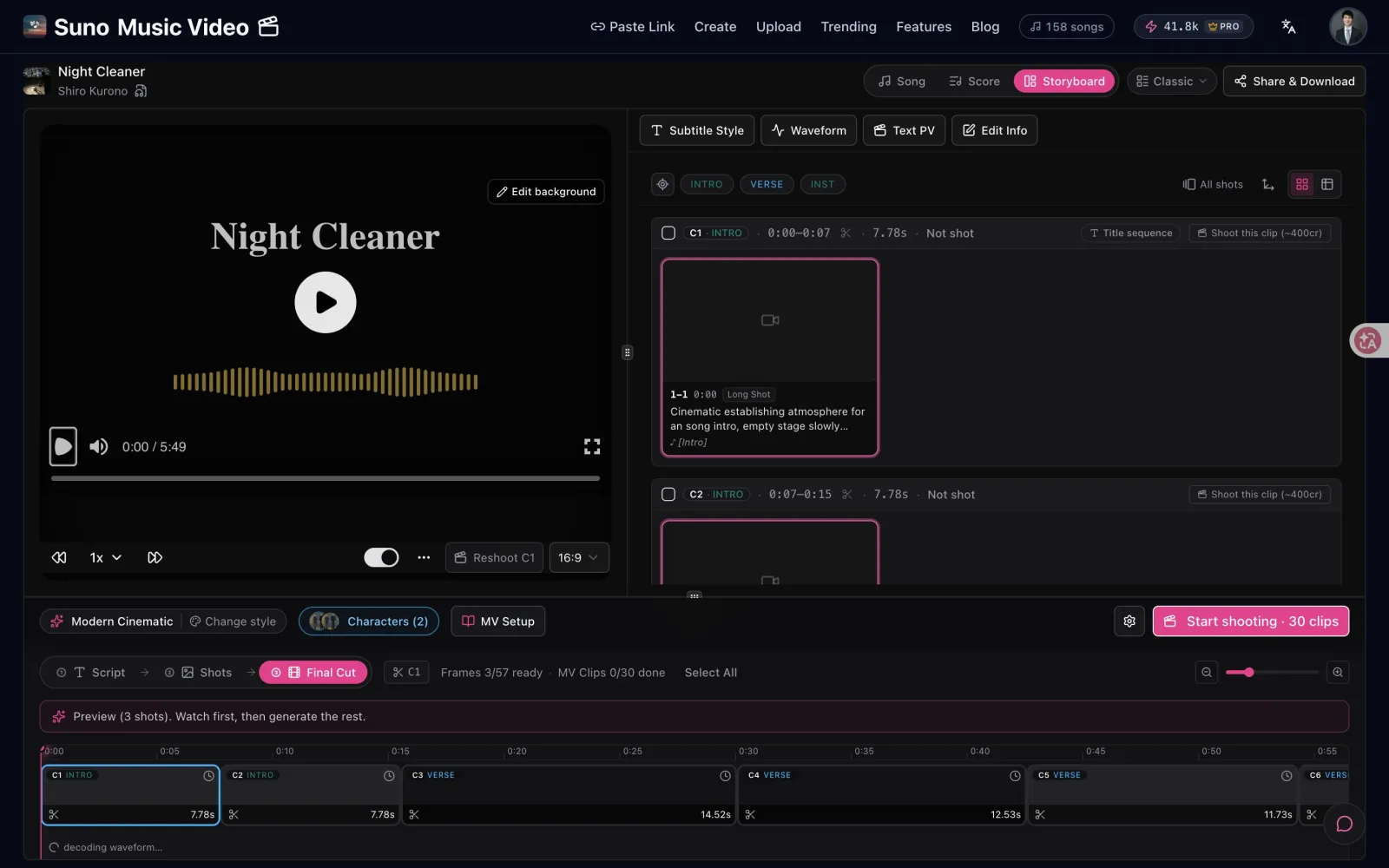 Real screen: the first run is a 3-shot preview, with each scene’s price.
FAQ
Can I paste these prompts as they are?
Yes. Each Style line is complete. Replace the lyric lines in brackets with your own words and keep the tags.
Do these work on the Suno free plan?
Yes. The free plan uses v6-mini, and the Style + Lyrics boxes work the same way. Free songs can’t be used commercially, so if you plan to monetize, make the song on a paid plan. Details in what the Suno free plan includes.
Why does Suno ignore part of my prompt?
Usually the style line is too long or asks for two different things. Keep it to one genre, 2–3 instruments, one voice, one mood, one speed.
How do I make an instrumental?
Turn on Instrumental and leave the lyrics empty. Adding “instrumental” to the end of the style line helps too.
Where do I go after the song?
Paste the song link into SunoMV to build a lyric video, or read the song to music video walkthrough. For a deeper method, see the 7-step Suno prompt method.
Popular guides
- 01 How to Make a Music Video for Your Suno Song: Paste the Link (2026)
- 02 Make AI Songs Free in 2026 — Then Turn Them into an MV
- 03 Turn a v5 Song into a Shareable Music Video (2026)
- 04 Turn a Suno Song into a Free MP4 — Not a Static Cover
- 05 Suno v5.5 Guide: Voices, Custom Models & My Taste Explained (2026)
More in this series
- Suno V5.5 Voices + Custom Models Complete Workflow: Create Personalized AI Music Videos with SunoMV
- The Intro-Build-Drop MV Structure Method: Choreographing EDM as Visual Story with SunoMV (2026)
- Seasonal Mood Songwriting Methodology: Translate Four-Season Sensory Memory into Songs with SunoMV (2026)
- Bridge & Breakdown Arrangement Method: Stop Your AI Songs From Getting Boring on Replay (SunoMV 2026)
- Chord-Progression-Driven Songwriting: 5 Common Progressions, SunoMV Prompts, and a Repeatable Method (2026)