/icon.png)
วิธีทำมิวสิควิดีโอด้วย AI จากเพลงไหนก็ได้ (คู่มือ 2026)

การทำมิวสิควิดีโอด้วย AI จากเพลงทำได้แบบนี้ อัปโหลดเพลง เลือกลุค แล้วให้ AI ซิงก์เนื้อเพลงและวาดภาพให้หนึ่งภาพต่อหนึ่งบรรทัด คุณจะได้ดูตัวอย่างฟรีก่อน จากนั้นค่อยวาดส่วนที่เหลือของเพลง ถ่ายทำฉากที่อยากให้เคลื่อนไหว และส่งออกวิดีโอ 9:16 หรือ 16:9 ใน SunoMV เพลงจะเป็นอะไรก็ได้ ทั้งเสียงที่คุณอัดเอง ไฟล์ MP3 จากเครื่องมือเพลง AI ใดก็ได้ หรือไฟล์วิดีโอ
ไม่ใช่คลิกเดียวจบ คุณเห็นทุกขั้นตอน และทุกขั้นแสดงราคาก่อนเริ่มทำ ด้านล่างคือ สิ่งที่ทำได้จากหนึ่งเพลง สี่ขั้นตอนพร้อมหน้าจอจริง ค่าใช้จ่าย และข้อผิดพลาดที่ทำให้เครดิตหมดเปล่า
เริ่มจากเพลงไหนก็ได้
อัปโหลด MP3, WAV, M4A หรือไฟล์วิดีโอ สูงสุด 500 MB วางเนื้อเพลงไว้ ซับจะได้ตรง
อัปโหลดเพลงของฉัน🎁 สมัครฟรีรับ 100 เครดิต พอสำหรับพรีวิวสตอรีบอร์ดแรก
“Hero” ทำใน SunoMV: ท่อนฮุก 30 วินาที ภาพสตอรี่บอร์ดที่มีการเคลื่อนกล้องและเนื้อเพลงที่ซิงก์กัน
สิ่งที่ทำได้จากหนึ่งเพลง
ก่อนอัปโหลด ให้ตัดสินใจก่อนว่าอยากให้ส่วนไหนของวิดีโอเคลื่อนไหวจริง ๆ ตัวเลือกนี้กำหนดทั้งหน้าตาและค่าใช้จ่ายส่วนใหญ่
| ประเภท | สิ่งที่เห็นบนหน้าจอ | เหมาะกับ | ค่าใช้จ่าย |
|---|---|---|---|
| วิดีโอเนื้อเพลง | เนื้อเพลงเคลื่อนไหวเต็มจอบนพื้นหลัง | เพลงที่คำร้องสำคัญ งานที่แฟน ๆ อัปโหลด | ไม่ใช้เครดิตวิดีโอ |
| วิดีโอสตอรี่บอร์ด | หนึ่งภาพต่อหนึ่งบรรทัดเนื้อเพลง พร้อมการเคลื่อนกล้อง | เพลงที่ปล่อยส่วนใหญ่ ท่อนร้อง เพลงช้า | ภาพ: 8–35 เครดิตต่อภาพ |
| ฉากที่ถ่ายทำ | คลิปวิดีโอ AI จริงสำหรับฉากที่คุณเลือก | ท่อนเปิด ท่อนฮุก ช่วงที่คนอยากแชร์ | วิดีโอ: คิดราคาต่อวินาที |
คนส่วนใหญ่ผสมกัน คือถ่ายทำท่อนฮุก ปล่อยท่อนร้องเป็นภาพ และใช้ฉากเนื้อเพลงในท่อนบริดจ์ ดูแต่ละลุคได้ในหน้าของมันเอง: วิดีโอเนื้อเพลง, ภาพประกอบเพลง, มิวสิควิดีโอเล่าเรื่อง
หลักง่าย ๆ: ถ่ายทำแค่ 2–3 ฉากที่คนจะจำได้ ที่เหลือเป็นภาพที่มีการเคลื่อนไหวก็พอ คนที่เลื่อนฟีดอยู่ไม่สังเกตหรอก
ทีละขั้น: จากไฟล์เพลงเป็นมิวสิควิดีโอ
ขั้นที่ 1: อัปโหลดเพลงของคุณ
เปิดแท็บ Upload บน suno.bi แล้วลากไฟล์ใส่ ได้ทั้ง MP3, WAV, M4A, MP4 หรือ MOV ขนาดสูงสุด 500 MB
- วางเนื้อเพลงถ้ามี ถ้าเว้นว่าง AI จะถอดเนื้อเพลงให้ แต่คำที่ร้องบางครั้งฟังผิด ถ้าวางเนื้อเพลงเอง ซับไตเติลจะถูกต้อง และไม่ต้องมาแก้ทีละบรรทัดทีหลัง
- เป็นเพลงบรรเลง? เปิด “No sung lyrics” เพลงจะถูกแบ่งเป็นช่วง (อินโทร จังหวะ พัก เอาต์โทร) เพื่อให้ทำภาพหรือคลิปสำหรับแต่ละช่วงได้
- ทำเพลงใน Suno? วางลิงก์ Suno แทนการอัปโหลด ดู วิธีทำมิวสิควิดีโอสำหรับเพลง Suno
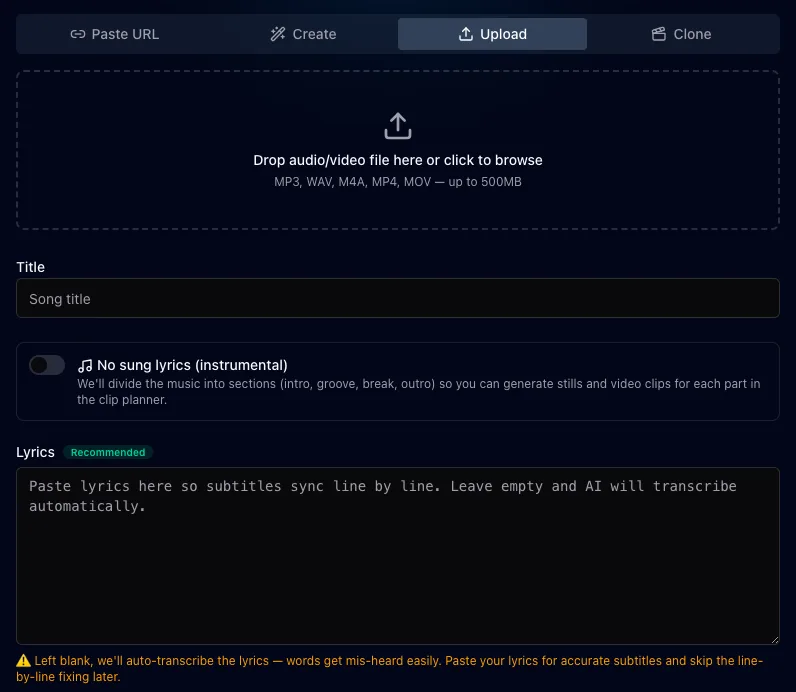
หน้าจอจริง: แท็บ Upload
ขั้นที่ 2: เลือกลุค
เลือกจาก 36 สไตล์ภาพ ตั้งแต่ภาพถ่ายแนวภาพยนตร์ อนิเมะ ไปจนถึงภาพหมึกจีน อยากให้นักร้องคนเดิมอยู่ทุกฉากไหม? เพิ่มรูปใบหน้า แล้วตัวเอกจะหน้าเดิมตลอดทั้งเรื่อง
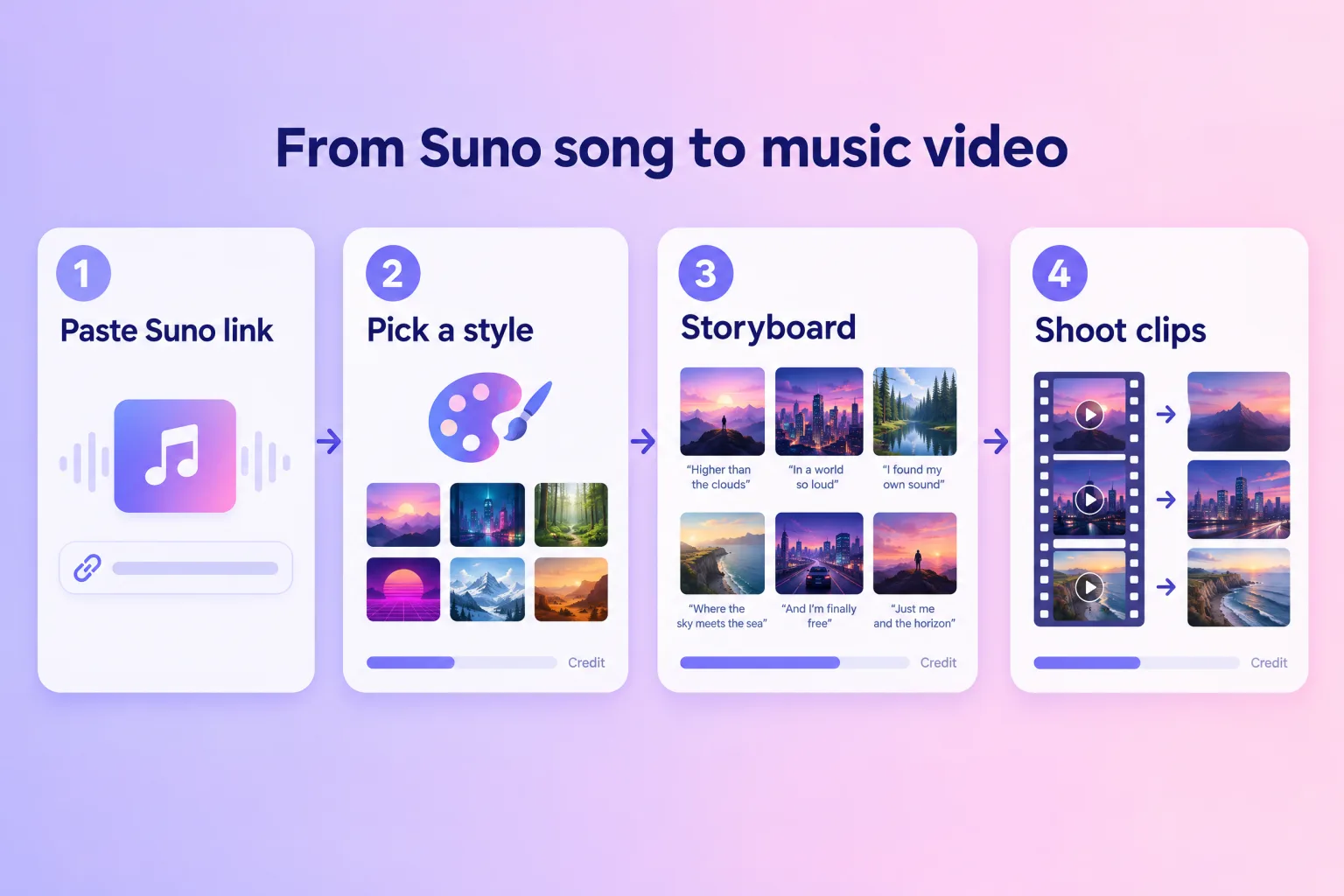
ภาพประกอบสี่ขั้นตอน
ขั้นที่ 3: ดูตัวอย่าง
รอบแรกวาดแค่ไม่กี่ภาพ คุณจึงตัดสินลุคได้ก่อนจะใช้เครดิตกับทั้งเพลง ชอบไหม? วาดส่วนที่เหลือ ไม่ชอบ? เปลี่ยนสไตล์ หรือแก้คำอธิบายภาพของบรรทัดนั้นแล้ววาดใหม่
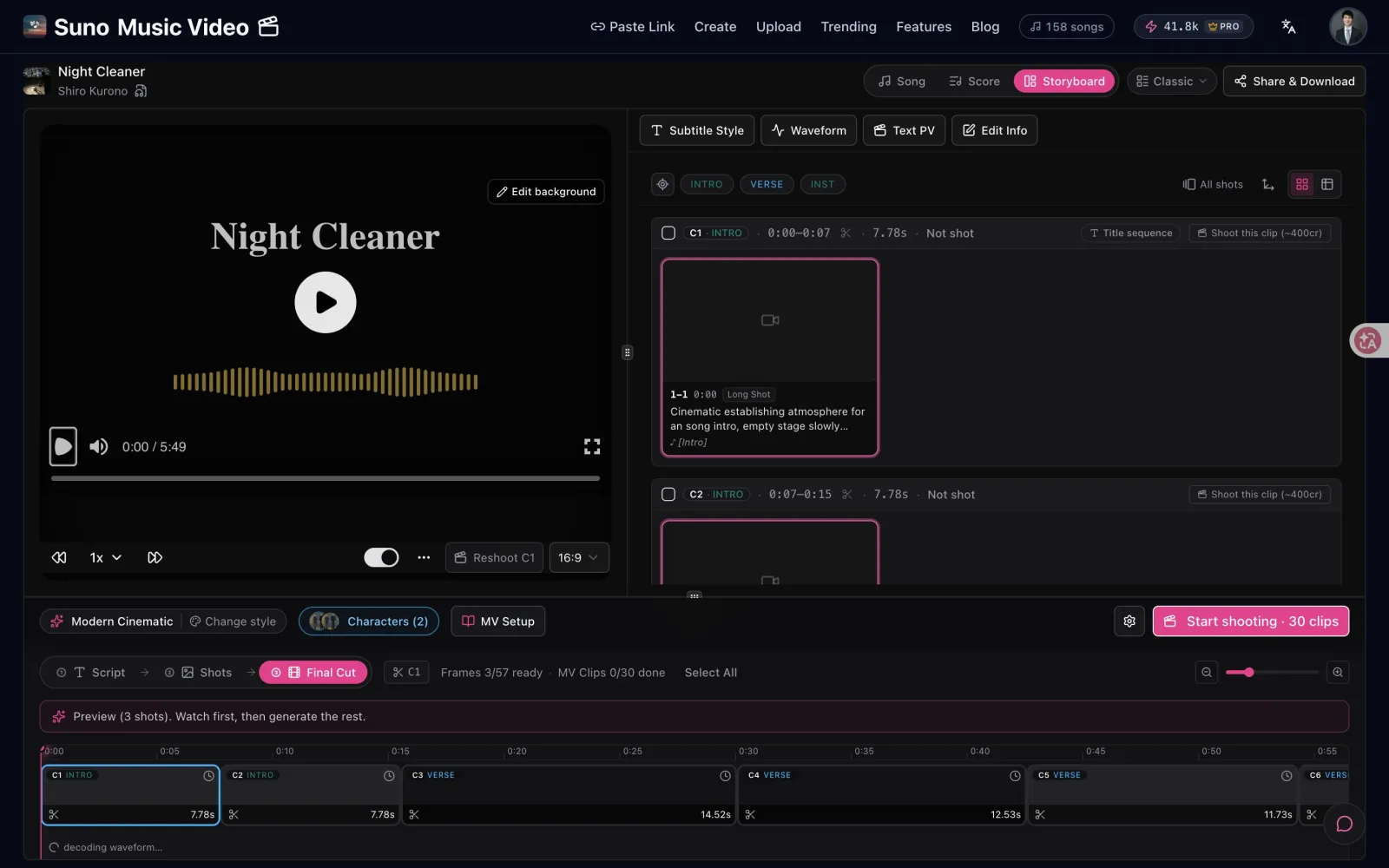
หน้าจอจริง: รอบแรกเป็นตัวอย่าง และทุกฉากแสดงราคา
ขั้นที่ 4: ถ่ายทำฉากที่ต้องการ แล้วส่งออก
บนไทม์ไลน์ ถ่ายทำฉากที่อยากให้เคลื่อนไหว ฉากที่เหลือจะเล่นเป็นภาพที่มีการเคลื่อนกล้อง หรือเป็นฉากเนื้อเพลง ซึ่งทั้งสองแบบไม่ใช้เครดิตวิดีโอ เลือกสไตล์ซับไตเติล แล้วส่งออก 9:16 สำหรับ TikTok, Reels และ Shorts หรือ 16:9 สำหรับ YouTube
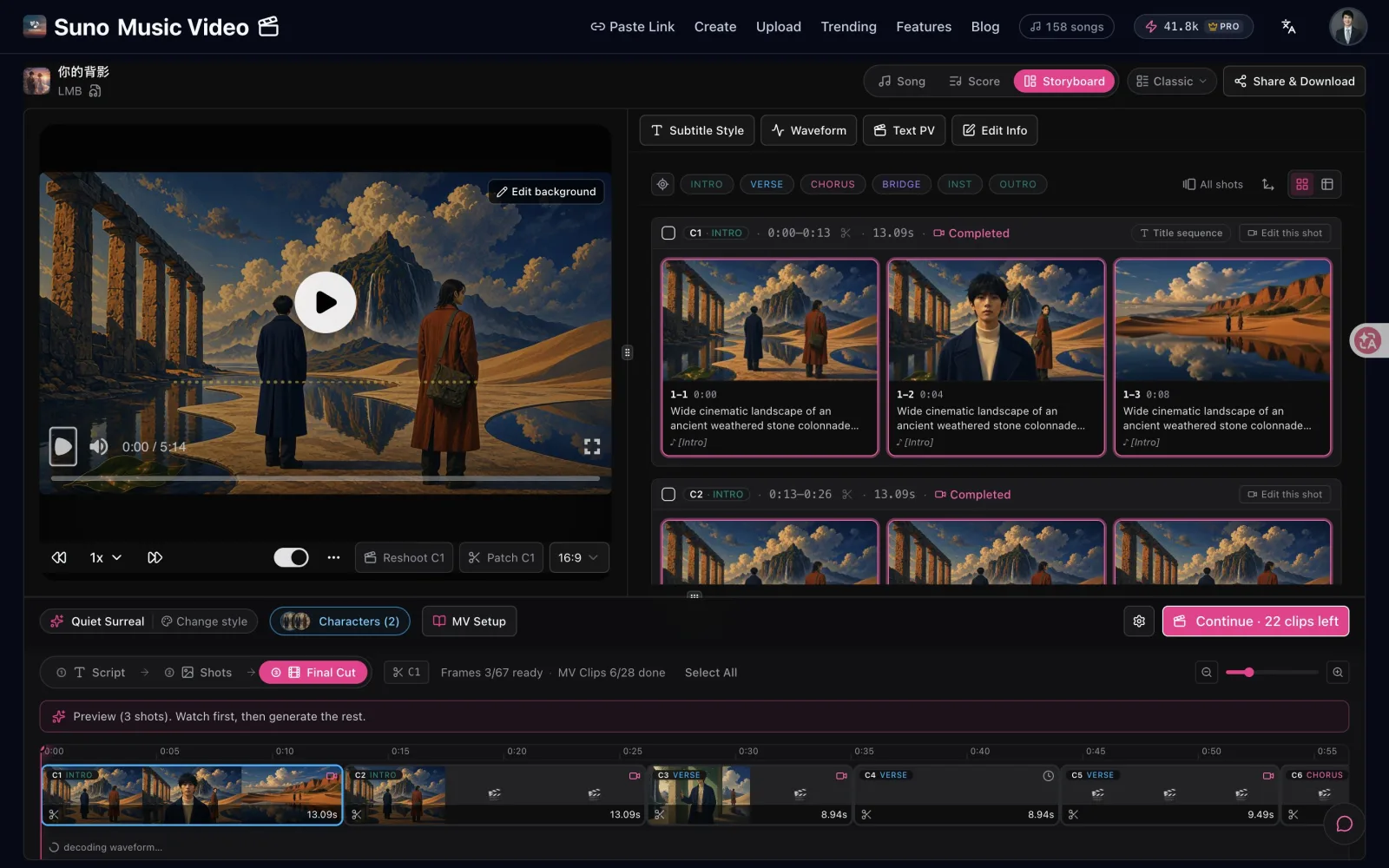
หน้าจอจริง: ฉากที่ถ่ายทำบนไทม์ไลน์
ค่าใช้จ่าย
ราคาอยู่บนปุ่มก่อนที่คุณจะกด
| รายการ | ราคา |
|---|---|
| เพิ่มเพลงและดูตัวอย่าง | ฟรี |
| บัญชีใหม่ | 100 เครดิตฟรี พอสำหรับภาพตัวอย่างชุดแรก |
| ภาพ | 8–35 เครดิตต่อภาพ ขึ้นกับโมเดลภาพ |
| ฉากวิดีโอ | คิดต่อวินาที โมเดลเริ่มต้นราคา 50 เครดิตต่อวินาทีที่ 720p |
| ฉากเนื้อเพลงและภาพที่มีการเคลื่อนไหว | ไม่ใช้เครดิตวิดีโอ |
| ส่งออก | ต้องใช้แพ็กเกจแบบชำระเงิน Pro มี 5,000 เครดิตต่อเดือน, 1080p, ไม่มีลายน้ำ |
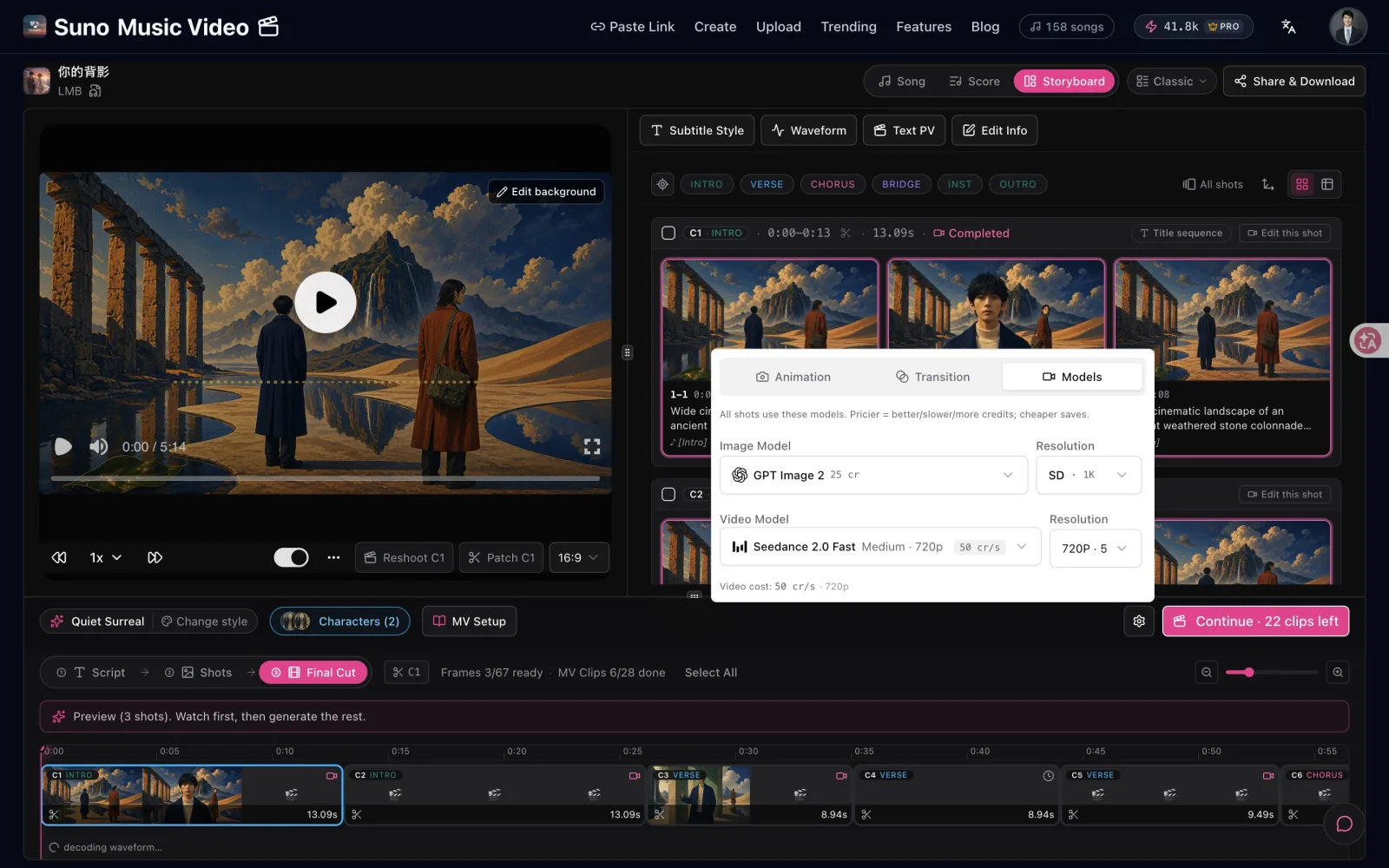
หน้าจอจริง: ทุกโมเดลแสดงราคา
ข้อผิดพลาดที่พบบ่อย (และวิธีเลี่ยง)
- คาดหวังว่าคลิกเดียวจบ คุณจะได้สตอรี่บอร์ดและตัวอย่างก่อน แล้วค่อยตัดสินใจว่าจะถ่ายทำอะไร เผื่อเวลาเลือกสักไม่กี่นาที ไม่ใช่ศูนย์
- ถ่ายทำทุกฉาก วิดีโอเป็นส่วนที่แพง ถ่ายทำท่อนเปิดกับท่อนฮุก ส่วนท่อนร้องปล่อยเป็นภาพ
- ข้ามช่องเนื้อเพลง การถอดเสียงอัตโนมัติฟังคำร้องผิดได้ วางเนื้อเพลงแล้วซับไตเติลจะตรงตั้งแต่ต้น
- ซับไตเติลอ่านยาก ภาพท่อนฮุกที่รกจะกลืนตัวอักษร ลองดูแบบปิดเสียงหนึ่งรอบ ถ้าบรรทัดไหนอ่านยาก ให้เลือกสไตล์ซับไตเติลที่มีขอบหรือแถบ
- ส่งออกทิศทางเดียว วิดีโอ 16:9 จะถูกตัดบนมือถือ ส่งออกเวอร์ชัน 9:16 สำหรับ TikTok, Reels และ Shorts ด้วย
- หน้าตาเดิมนานสามนาที เปลี่ยนสไตล์ภาพหรือการเคลื่อนกล้องในท่อนฮุก เพื่อให้วิดีโอยกระดับตามเพลง
หลักง่าย ๆ: ถ้าร่างแรกดูแบนและบอกไม่ได้ว่าเพราะอะไร ให้ดูท่อนฮุก ส่วนใหญ่เพลงขึ้นสูงสุดตรงนั้น แต่วิดีโอไม่ขึ้นตาม
เช็กลิสต์สั้น ๆ ก่อนโพสต์
- เลือกประเภทถูกไหม? วิดีโอเนื้อเพลง สตอรี่บอร์ด หรือฉากที่ถ่ายทำ ให้เข้ากับเพลง
- อ่านออกไหม? ปิดเสียงแล้ว ซับไตเติลทุกบรรทัดอ่านง่าย
- มีจังหวะขึ้นไหม? ท่อนร้องสงบ ท่อนฮุกใหญ่ขึ้น
- ครบทั้งสองสัดส่วน? 16:9 สำหรับ YouTube, 9:16 สำหรับ Shorts, TikTok และ Reels
- สิทธิ์เป็นของคุณ? เพลงเป็นของคุณ หรือคุณได้รับอนุญาตให้ใช้
อยากเปรียบเทียบเครื่องมือก่อน? ดู เครื่องมือทำมิวสิควิดีโอด้วย AI ที่ดีที่สุด อยากรู้เรื่องซับไตเติลเพิ่ม? อ่าน คู่มือวิดีโอเนื้อเพลงด้วย AI
คำถามที่พบบ่อย
ใช้เพลงที่ไม่ได้มาจาก Suno ได้ไหม?
ได้ อัปโหลดไฟล์เสียงหรือวิดีโออะไรก็ได้ ทั้งเสียงที่คุณอัดเอง เพลงจากเครื่องมือเพลง AI อื่น หรือเดโม คุณต้องรับผิดชอบเรื่องสิทธิ์ในเพลงเอง ตัวเลือกที่ปลอดภัยที่สุดคือเพลงที่คุณทำหรือเป็นเจ้าของ
ต้องมีเนื้อเพลงไหม?
ต้องมีเฉพาะเมื่ออยากได้ซับไตเติล วางเนื้อเพลงเพื่อให้ซิงก์แม่นที่สุด หรือเว้นช่องว่างให้ AI ถอดเสียงให้ เพลงบรรเลงก็ใช้ได้ เปิด “No sung lyrics” แล้วเพลงจะถูกแบ่งเป็นช่วง
ไฟล์แบบไหนใช้ได้ และใหญ่ได้เท่าไร?
MP3, WAV, M4A, MP4 และ MOV ขนาดสูงสุด 500 MB
ใช้เวลานานแค่ไหน?
ภาพตัวอย่างมักพร้อมภายในไม่กี่นาที การวาดทั้งเพลงและถ่ายทำฉากใช้เวลามากกว่า ทำทีละฉาก และคุณเลือกเองว่าจะทำมากแค่ไหน
ฟรีไหม?
การเพิ่มเพลงและดูตัวอย่างฟรี บัญชีใหม่ได้ 100 เครดิตฟรีสำหรับภาพชุดแรก การส่งออกวิดีโอต้องใช้แพ็กเกจแบบชำระเงิน Pro มี 5,000 เครดิตต่อเดือน, 1080p และไม่มีลายน้ำ
แก้ไขวิดีโอทีหลังได้ไหม?
ได้ คุณวาดภาพใหม่ได้ทุกภาพใน SunoMV และไฟล์ที่ส่งออกเป็น MP4 มาตรฐาน เปิดในโปรแกรมตัดต่อวิดีโอใดก็ได้เพื่อเพิ่มอินโทร โลโก้ หรือเอฟเฟกต์เพิ่มเติม
ทำชิ้นแรกของคุณ
คุณแค่ต้องมีเพลงหนึ่งเพลงกับเวลาไม่กี่นาทีเพื่อดูตัวอย่าง อัปโหลด เลือกลุค แล้วตัดสินใจว่าฉากไหนควรได้เคลื่อนไหว
เริ่มจากเพลงไหนก็ได้
อัปโหลด MP3, WAV, M4A หรือไฟล์วิดีโอ สูงสุด 500 MB วางเนื้อเพลงไว้ ซับจะได้ตรง
อัปโหลดเพลงของฉัน🎁 สมัครฟรีรับ 100 เครดิต พอสำหรับพรีวิวสตอรีบอร์ดแรก
—— ทีม SunoMV
คู่มือยอดนิยม
- 01 รวม Prompt Suno 30 แบบ แยกตามแนวเพลง ก๊อปไปใช้ได้เลย (2026)
- 02 วิธีทำมิวสิกวิดีโอจากเพลง Suno ของคุณ: แค่วางลิงก์ (2026)
- 03 7 เครื่องมือสร้างเพลง AI ที่ฟรีจริงในปี 2026 (Suno, Udio, ACE-Step)
- 04 คู่มือเพลง AI ที่สมบูรณ์ของ Suno v5 (2026): จากหน้าว่างเปล่าไปจนถึงซิงเกิลพร้อมเปิดตัว
- 05 ดาวน์โหลดเพลง Suno เป็น MP4 ฟรี: เทียบ 3 วิธี (2026)
บทความอื่นในชุดนี้
- Suno ให้เพียงแค่คลิปสั้น — นี่คือวิธีเปลี่ยนเป็นวิดีโอเพลงเต็มความยาว (คู่มือ 2026)
- สร้างมิวสิควิดีโอโดยไม่ต้องเก่ง Editing: คู่มือเต็มจากเสียงไปจนถึง MV สำเร็จ (2026)
- วิธีสร้างมิวสิควิดีโอด้วย AI (คู่มือฉบับสมบูรณ์ 2026): 3 เส้นทาง เริ่มได้แม้ไม่มีประสบการณ์
- Suno สามารถสร้าง Music Videos ได้หรือไม่? (2026 Answer + Free Workaround)
- วิธีทำมิวสิกวิดีโอจากเพลง Suno ของคุณ: แค่วางลิงก์ (2026)
ดูบทความทั้ง 26 เรื่องในหัวข้อ เปลี่ยนเพลงให้เป็นมิวสิกวิดีโอ →