

Can Suno Make Music Videos? Yes, 15-Second Clips (2026 Answer + Full-Song Option)

Short answer: yes, in short clips. On November 17, 2026 Suno launched Suno Visuals, which makes 5 to 15 second video clips from a section of your song, with optional lip sync and on-screen lyrics. Longer videos are built by extending and combining clips, and every image or video uses Visual credits, a balance separate from your song credits. What Suno still does not do is turn a whole three-minute song into a music video in one go.
If your goal is a full-length video with synced lyrics, changing visuals, and scene transitions, the kind you post as the official video for the song, you still need a dedicated tool. This guide explains what Suno does and does not do today, then shows the fastest way to get a full music video from any Suno song. For a deeper look at the new feature, read our Suno Visuals review.
What Suno Gives You Today
Suno is a music generation engine first. Here is what you can get on the video side as of November 2026:
- Song download (MP4): the classic Suno video download is still your song playing over its static cover image. No moving visuals, no lyric subtitles.
- Suno Visuals clips: 5–15 second generated clips from a chosen section of the song, with lip sync and styled lyrics, in 9:16, 1:1, 16:9, 4:3 or 3:4. Pro and Premier get a small one-time grant of Visual credits to try it; after that you buy Visual credit packs or move to the $120/month Platinum plan, which includes 20,000 Visual credits a month.
- Longer videos: extend clips and combine them into a “Sequence” in the Visuals Editor. Each extension uses more Visual credits, and Suno does not publish a per-second rate.
Suno now makes great short clips. A full-song music video is still a separate job.
What a Real Music Video Needs
A music video that holds attention and earns algorithmic reach has three things Suno’s export lacks:
- Synced lyrics — words appearing in time with the vocals, ideally word-by-word like a karaoke screen
- Changing visuals — imagery that evolves with the song’s story and emotion, not one frozen frame
- Motion between scenes — transitions that keep the eye moving
A 15-second clip covers one of those moments. Covering the whole song is the gap SunoMV fills.
How to Turn a Whole Suno Song into a Music Video
SunoMV is an AI music video generator built specifically for Suno creators. It is the only one with native Suno link support — paste a link and everything happens automatically.
Step 1: Paste your Suno link
Copy your song’s share link (https://suno.com/song/xxx) and paste it into suno.bi. SunoMV automatically pulls the audio, cover art, title, and full lyrics — no download or manual upload needed. (Prefer your own track? You can also upload an MP3/WAV or generate an original song with AI instead.)

Real screen: paste a Suno song link on suno.bi
Step 2: Lyrics sync automatically
SunoMV runs word-level forced alignment so every lyric lands exactly on the beat — the same idea behind a karaoke display. This works across every Suno version, from v3 through the latest v5.5.
Step 3: Pick a caption style and visuals
Choose from 18 caption styles, including the viral short-form looks creators actually want — Hormozi, MrBeast, Pop, word-by-word Karaoke, and KTV Fill. Then let suno.bi generate a unique AI image for each lyric line using the pick of 6 image models (Seedream 5, Nano Banana 2/Pro, Flux 2, GPT Image 2, Seedream 4.5). Upload a reference photo and switch on Character Lock to keep the same character across every shot.
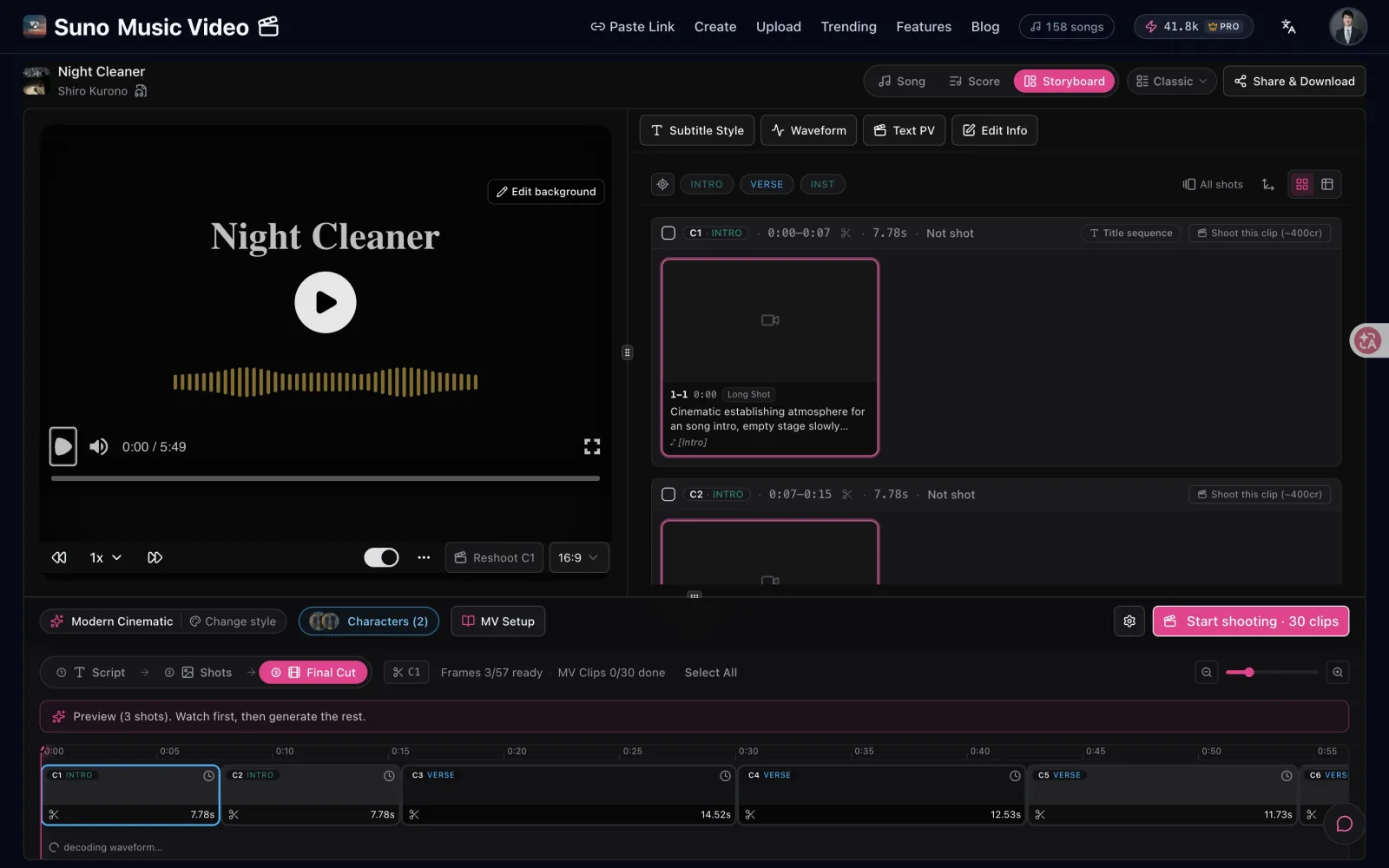
Real screen: the SunoMV storyboard, one picture per lyric line across the whole song
Step 4: Add motion and export
Connect scenes with AI video transitions — an actual AI video model (Seedance 2.0, Kling v3 Pro, Google Veo 3.1, and more) morphs one scene into the next. Then export your MP4 in 720p (free), 1080p, or up to 2K, in landscape, vertical, or square.
The whole flow — from pasting a link to a finished music video — typically takes under five minutes.
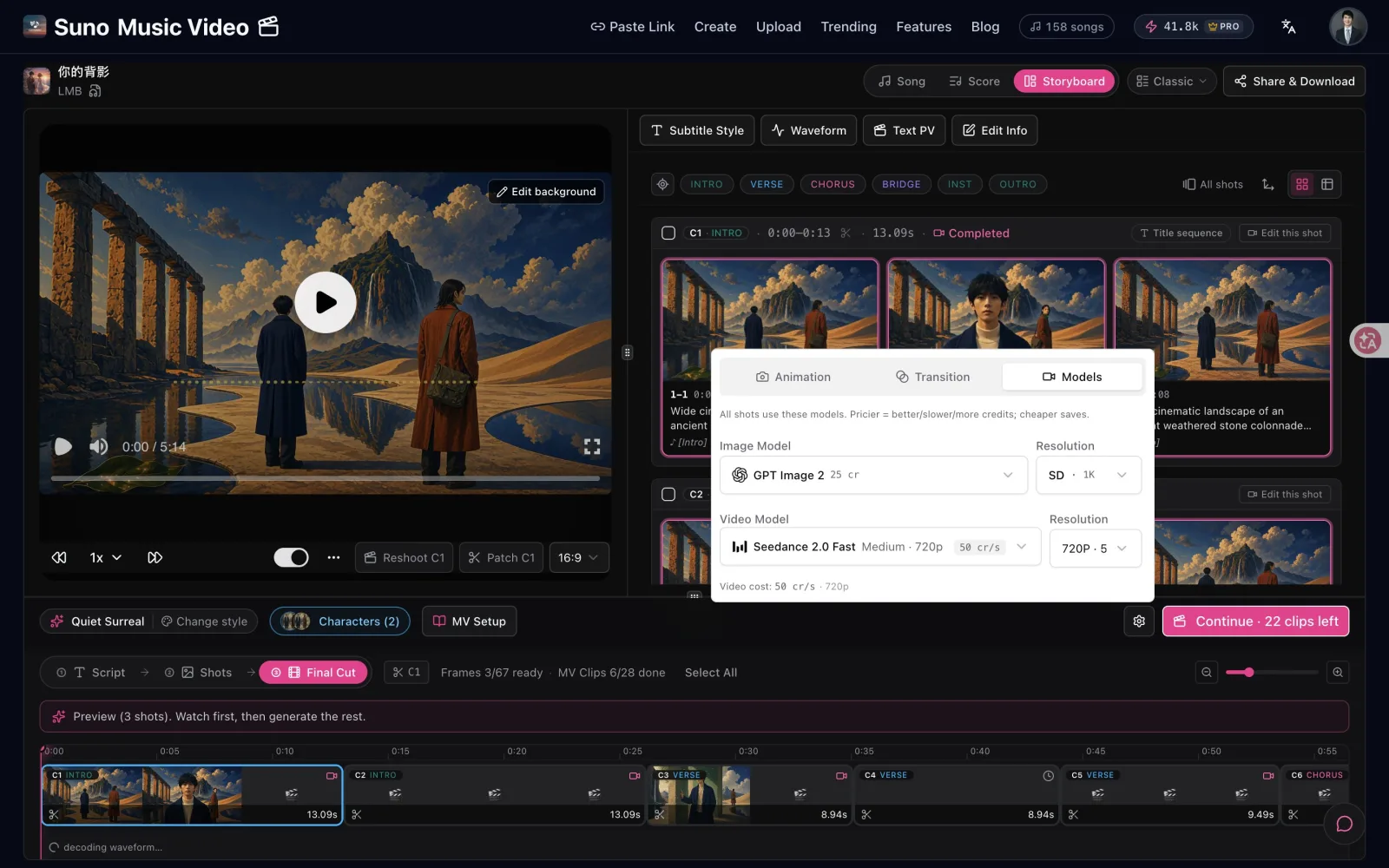
Real screen: each video model shows its credit price per second before you generate
Suno vs SunoMV: Side by Side
| Suno (Visuals) | SunoMV | |
|---|---|---|
| Video length | 5–15 s clips; longer via extended Sequences | The whole song in one project |
| Lyric subtitles | ✅ Per clip | ✅ Word-by-word across the full song, 18 caption styles |
| Changing visuals | ✅ Generated clip | ✅ AI image per lyric line, AI video where you choose |
| Video models | One (H3 Move, based on MiniMax H3) | Several, chosen per shot |
| Vertical (9:16) | ✅ | ✅ Built for TikTok / Shorts |
| Pricing | Separate Visual credits; per-second rate not published | Price shown per shot before you generate |
| Free | Small trial grant for Pro / Premier | 3 songs a day, full preview free |
Frequently Asked Questions
Does Suno make music videos automatically?
Partly. Since November 17, 2026, Suno Visuals can generate 5–15 second clips from a section of your song, paid with Visual credits. It does not turn a whole song into a music video in one step; the standard song download is still the cover image with audio. For a full-length video, paste your Suno link into SunoMV.
Can Suno AI create music videos with lyrics on screen?
Yes, inside Suno Visuals clips: you can turn on lyrics and set their style, position, font and color. The regular song download has no lyrics on screen. SunoMV adds word-by-word synced lyrics across the whole song, in 18 caption styles.
Is there a free way to make a Suno music video?
Yes. SunoMV’s free tier lets you create up to 3 music videos per day with synced lyrics. AI images and video transitions are available on paid plans.
Do I need to log in with my Suno account?
No. SunoMV only needs your song’s public link — never your Suno credentials.
The Bottom Line
Suno is the best place to make the song, and with Visuals it now makes good short clips too. For the full-length video, paste your Suno link into SunoMV and let the AI handle the lyrics, visuals, and transitions for the whole song.
Want the full walkthrough? Read How to Turn Any Suno Song into a Music Video, or learn more about exporting and downloading Suno videos.
Made in SunoMV · real exports
See what a song turns into
Every sample below is an untouched SunoMV export: 3 AI storyboard shots, one AI-filmed clip, then the lyrics. Each one uses a different caption style and frame size.
Popular guides
More in this series
- Turn a Suno Song into a Free MP4 — Not a Static Cover
- Suno Song to Music Video Workflow: Storyboard to Final Cut (2026)
- Upload Your Own Audio and Make a Music Video with SunoMV: The Complete Upload Mode Guide
- AI Music Video Export Guide (2026): How to Choose Between 720p, 1080p, and 2K (and Get Commercial Rights Right)
- The Creative Workflow for Adding Synced Lyrics to a Music Video (2026): A Methodology From Alignment to Publish