/icon.png)
How Much Does an AI Music Video Cost? Spend Credits Section by Section (2026)

Split a four-minute song into 21 shots, shoot AI video for every one of them, and you are looking at roughly 11,500 credits. But during the verses, people are reading the lyrics. During the 15-second intro, they are waiting for a picture. Where you spend matters more than how much.
This is not a “how to make a lyric video” guide. For that, read the AI lyric video generator guide. This post answers a narrower question: how much should each section of one music video cost? Every number below comes from the real SunoMV editor, on one song called “解密” (Decrypt): 3 minutes 54 seconds, 21 shots.
Illustration: different sections of one song, each with a look at a different price.
Five looks per shot, and what each one costs
In SunoMV’s shot editor, every shot has its own Picture setting. From cheapest to most expensive, there are five levels:
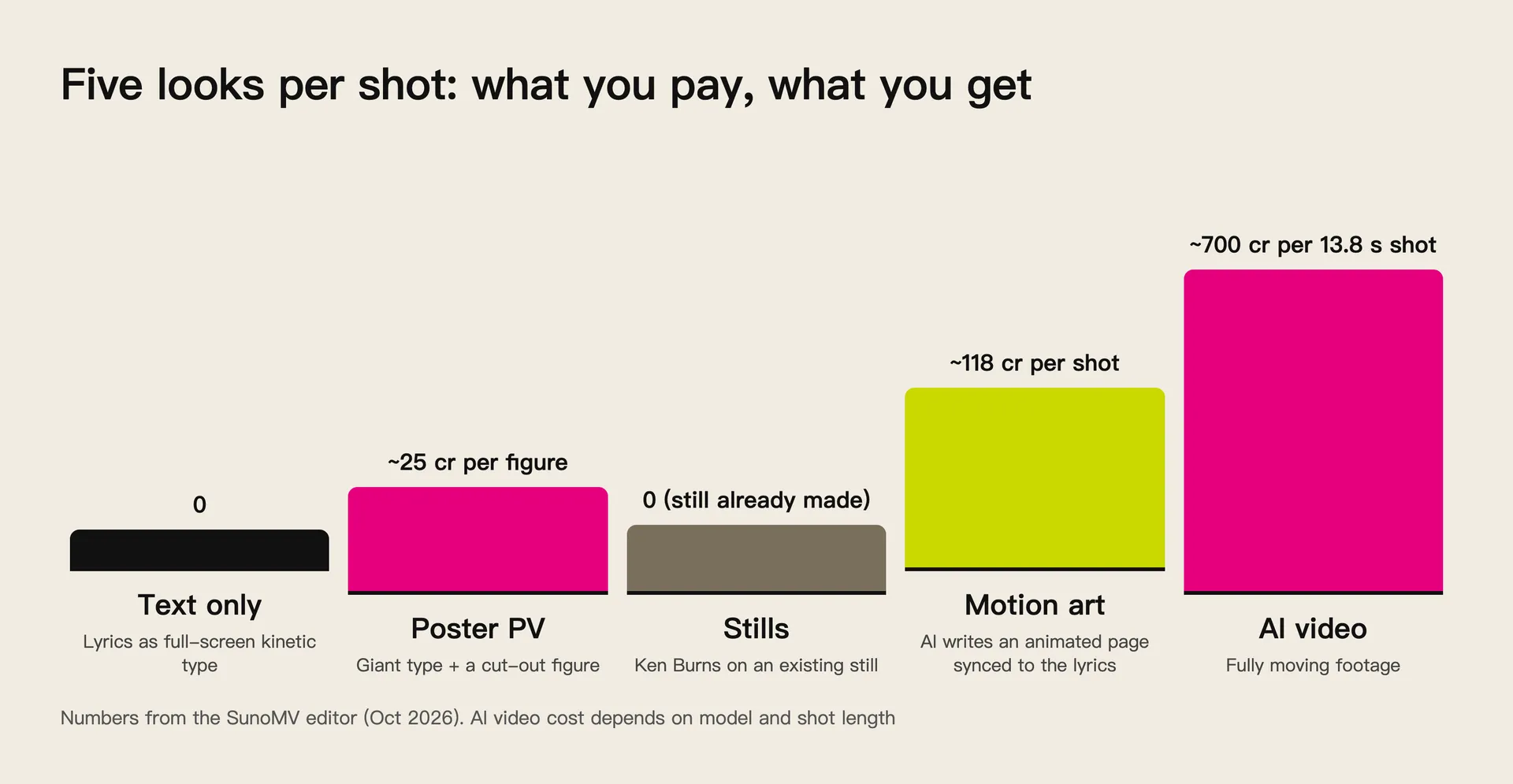
Numbers from the SunoMV editor, October 2026. AI video cost depends on the model and the shot length.
| Look | What you see | Credits | Best for |
|---|---|---|---|
| Text only (text PV) | Lyrics as full-screen kinetic type, with ghosting and grain | 0 | Verses, spoken lines, lyrics that carry the song |
| Poster PV | Text PV with a cut-out figure standing between the words | ~25 cr per figure | Chorus, the one line people should remember |
| Stills | The shot’s existing storyboard images, with slow push-ins | 0 if the images exist | Instrumental breaks, transitions, tight budgets |
| Motion art | AI draws a page of shapes and light that move with the shot’s lyrics | ~118 cr per shot | Sections that need motion without filmed footage |
| AI video | Real moving footage | ~700 cr for a 13.8 s shot | Intro, instrumental breaks, cinematic moments |
The biggest jump is AI video. SunoMV supports several video models. MiniMax H3 Max, for example, is priced per 5-second segment. Longer shots and higher resolutions cost more.
Cheap looks are not a new idea. Wikipedia’s history of the lyric video notes that Prince’s 1987 video for “Sign o’ the Times” was built from words pulsing to the music next to abstract shapes. In 1990, George Michael refused to appear in his videos, and the clip for “Praying for Time” showed only the lyrics on a black screen.
George Michael, “Praying for Time” (official video): lyrics only, start to finish.
Practical rule: Ask what the viewer is looking at in each section. If they are reading, do not pay for footage. If they are waiting for a picture, do not let the text get in the way.
Split the budget by song structure
Most pop songs follow the same song structure: intro, verse, chorus, instrumental break, bridge, outro. Attention lands differently in each part, so the money should too.
Intro and breaks need a picture. There are no lyrics here, so text cannot help. One good AI video shot earns its cost in the intro, because that is where people decide whether to keep watching.
Verses belong to the words. Verses tell the story. The lines are dense and they matter. Full-screen text PV makes every line readable, while busy footage pulls the eye away.
The chorus gets both. It is the peak of the song, so stack the layers: video underneath, big text PV lyrics on top. Neither gets lost.
Here is “Decrypt” split that way. This is the editor’s Balanced plan:
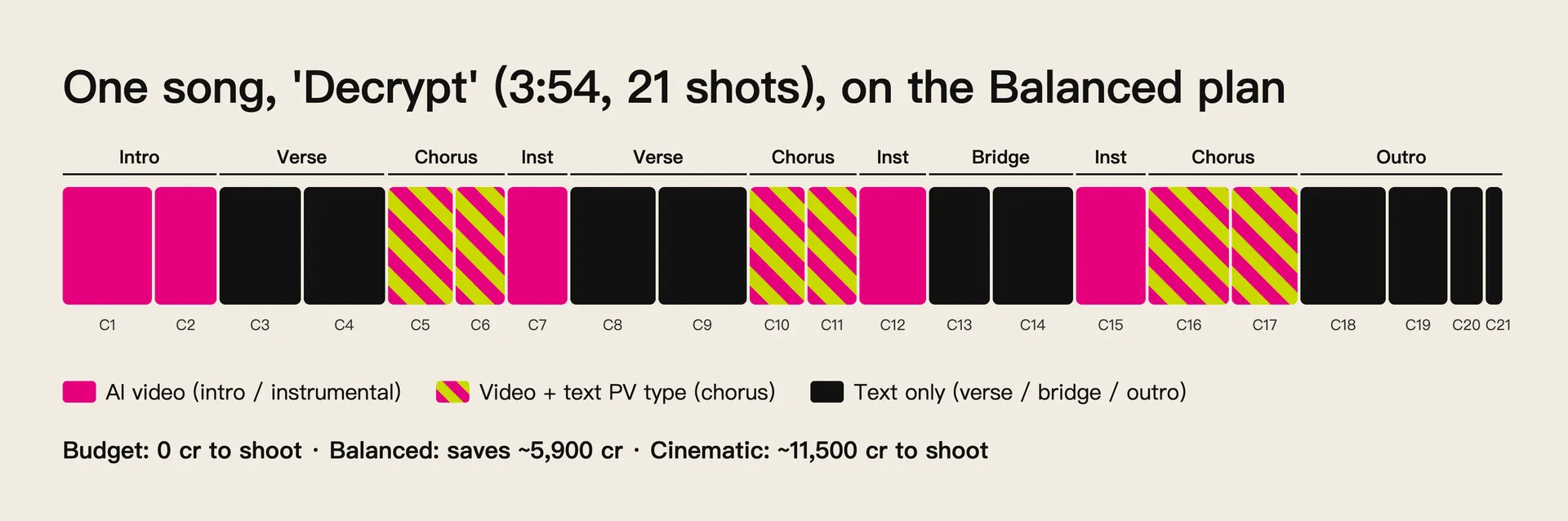
Of the 21 shots, 5 are instrumental and 6 are chorus. Balanced only shoots those 11 and lets the type carry the other 10.
Once the plan is applied, every shot header shows its look. Shots marked Text PV only stop showing “Not shot” and stay out of batch shooting:

SunoMV storyboard: C4 (verse) is text only. C5 (chorus) is video with text PV on top, still waiting to be shot.
Practical rule: The intro keeps people, the verse tells them something, the chorus is what they remember. Spend in that order and you will rarely spend wrong.
Three whole-song plans: Budget, Balanced, Cinematic
If you do not want to set looks shot by shot, open Text PV in the top bar and apply a Whole-song plan. Each plan card shows how many credits it would take to shoot, or how much it saves compared with your current setup.
For “Decrypt”, before anything was shot, the three cards read:
| Plan | What it does | Credits to shoot “Decrypt” | Good for |
|---|---|---|---|
| Budget | Every shot with lyrics uses Text PV. Instrumental shots use stills | ~0 cr (saves ~11,500) | Zero budget, or a first full draft |
| Balanced | Intro and breaks stay video, verses use Text PV, choruses put big lyrics over video | ~5,600 cr (saves ~5,900) | Most songs |
| Cinematic | AI video everywhere, with big lyrics over the chorus | ~11,500 cr | A release video with a real budget |
Three things to know:
- A plan only rewrites looks in bulk. You can still change any shot afterwards.
- Locked shots stay as they are. Lock the shots you already like, then apply a plan.
- The card numbers follow your current state. They count what is still left to shoot, so finished shots are never counted twice.
Here is the same shot (C3, a verse) in three looks. The first two reuse a storyboard image that already existed. The third costs nothing at all:
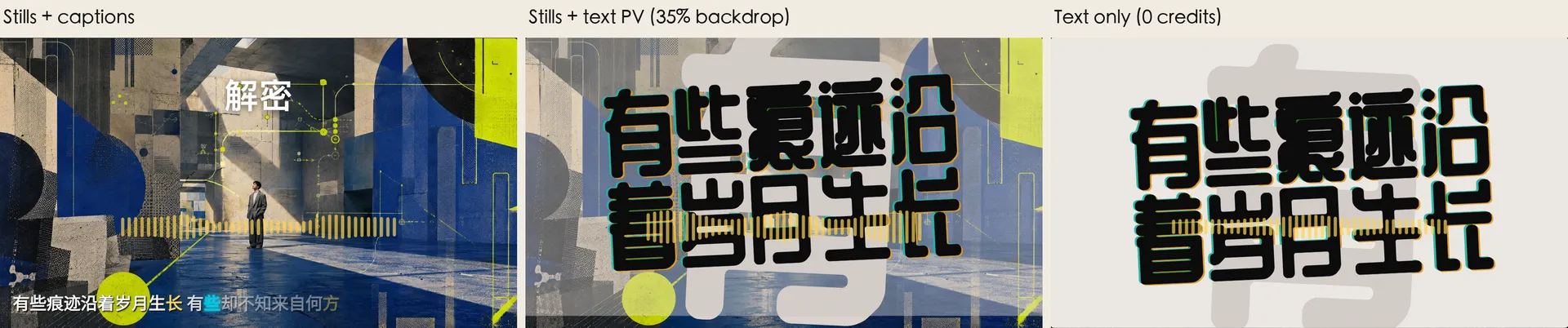
Single-shot preview in SunoMV’s shot editor. This is exactly what gets exported.
Practical rule: Apply Budget first and watch a complete draft. Then add credits only to the two or three shots that feel empty. That is far cheaper than shooting everything and cutting later.
Change looks shot by shot: picture, lyrics, backdrop
The plan sets the overall shape. The details live in the Text PV tab of each shot. Every shot has two choices:
- Picture: AI video, Stills, Text only, or Motion art
- Lyrics: Captions, Text PV, or Hidden
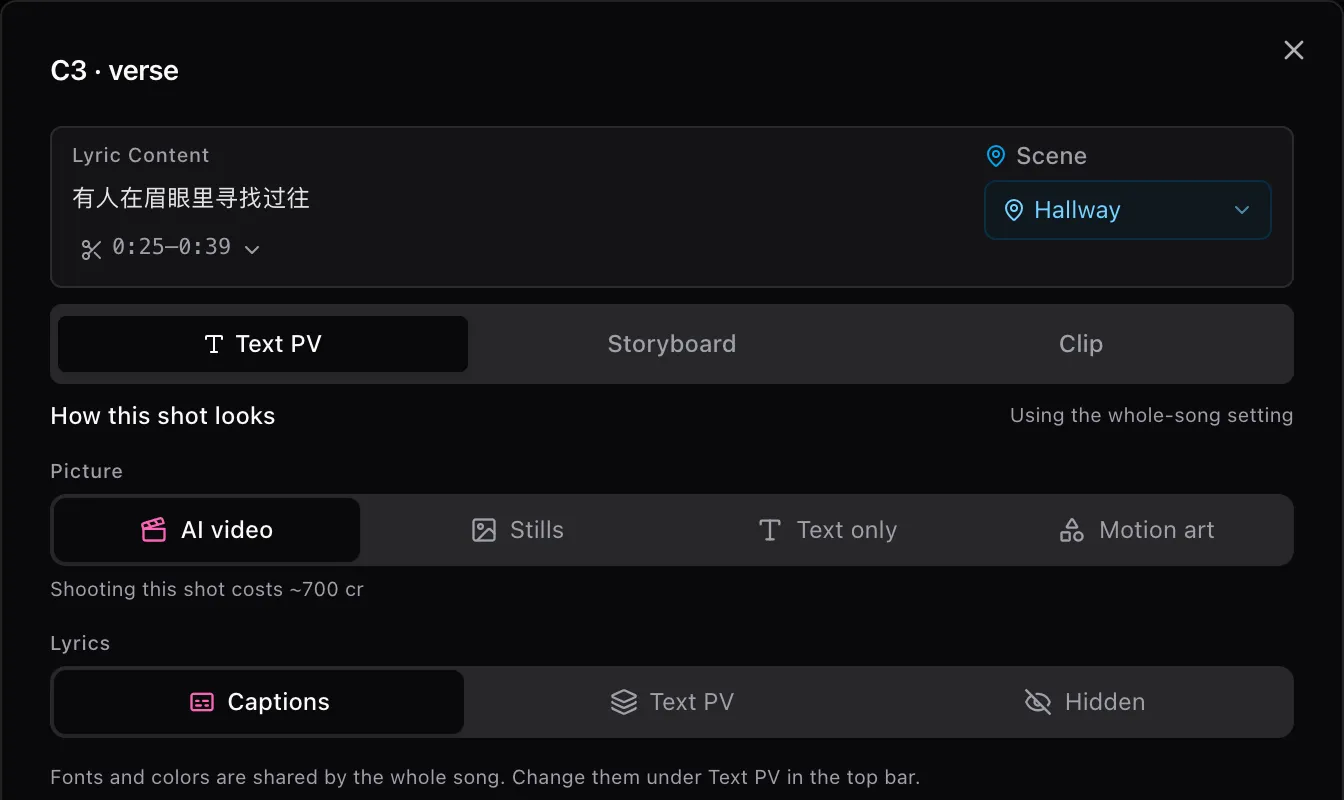
With AI video selected, the editor shows what this one shot costs to shoot. The preview below it is the exported result.
A few combinations that work well:
- One line per screen in the verse: set Picture to Text only. Lyrics switch to Text PV automatically.
- A chorus with impact: keep AI video or Stills, set Lyrics to Text PV, and drag Backdrop to around 30–40% so the picture shows through the type.
- A pure instrumental shot: set Lyrics to Hidden and let the picture speak.
- Motion without filming: set Picture to Motion art. It costs about 118 cr per shot, and failed attempts are refunded in full.
Fonts and colors are shared across the whole song. You pick them from 24 style packs under Text PV in the top bar, which keeps every section looking like the same video.
If you are changing a lot of shots, you can also tell the MV assistant “use text PV for the verses”, “no lyrics in the intro” or “save some credits”. It changes the shots for you and tells you how much you saved.
Poster-style music videos: giant type, a figure, the hook on top
A popular look right now feels like a moving poster. Huge words fill the frame, a cut-out figure stands in the middle, and the line that matters sits on top. It has real impact, and it costs about one image.
In SunoMV:
- Set the shot’s Picture to Text only, or use Stills with Text PV lyrics.
- Under Add a figure, describe who should stand there, for example “a girl in a red raincoat looking back”.
- Click Create figure (about 25 cr). You get a figure on a transparent background.
- The figure slots in between the background type and the main line. It rises in, pushes in slowly through the shot, and moves with the text PV rhythm.
A poster-style chorus built this way costs a fraction of an AI video shot, and you control the figure, the type and the colors.
For more full-screen type styles, see the Kinetic Typography Lyric Video page, which shows all 24 text PV styles on real lyrics.
Practical rule: Save the poster look for the chorus and one or two key lines. If every shot is a poster, nothing feels like a peak.
Finish a full music video without spending AI credits
If you just want a complete video first, you can build it without spending any AI credits:
- Paste a Suno link or upload your song and open the storyboard.
- Pick a style pack under Text PV in the top bar.
- Apply the Budget plan. Every shot with lyrics becomes full-screen type, and instrumental shots use stills (on a free account, storyboard images come out of your daily image allowance).
- Open each shot and press Play this shot to check the layout and timing of every line.
When you are done, the whole video plays from start to finish inside the editor. Exporting the finished video currently requires a paid plan, which also comes with more daily image and video allowance, so you can add AI video only to the shots that feel empty.
Still writing the song? Generate it in Suno or MiniMax Music 3.0 first, then come back for the video. For cover art and extra images, ChatImg generates them from a prompt. To turn someone else’s music video into notes, BibiGPT summarizes it for you.
Practical rule: Build a version that plays start to finish before you decide where the money goes. Until you have watched the whole thing, every per-shot budget is a guess.
FAQ
What is the difference between text PV and regular lyric captions?
Captions are a line of text at the bottom of the frame. Text PV makes the words the picture: full-screen layout, ghosting, grain. It is close to what the Japanese Vocaloid scene calls 文字PV. For word-by-word karaoke captions, see the word-by-word synced lyric video guide.
Do Text only shots use credits?
No. They are skipped by batch shooting, cost no credits, and no longer show “Not shot”.
Can I switch a shot back to AI video after applying a plan?
Yes. A plan only rewrites looks in bulk. You can change any shot in its editor, or click Use the whole-song setting to go back to the default.
How many credits does one AI video shot cost?
It depends on the model, resolution and shot length. In “Decrypt”, a 13.8-second verse shot is about 700 cr and an 11-second chorus shot about 600 cr. The exact number appears in the shot editor when you select AI video.
Can free accounts use text PV?
Yes, in the editor, with a full preview of every shot. Exporting the finished video requires a paid plan.
Ready to budget your own music video section by section? Open SunoMV, apply the Budget plan, watch the full draft, then decide which shots deserve real footage. For more lyric video techniques, see the free online lyrics video maker guide.
SunoMV Team
Popular guides
More in this series
- Music Video Storyboard Workflow: Preview the Shot, Then Lock 1080p
- How to Lip Sync a Suno Music Video Without Reshooting
- Suno Arrangement in Practice: Lock Song Structure with Timeline Section Tags So Your MV Storyboard Has Something to Stand On (2026)
- Christmas AI Music Video Planning: The Q4 Holiday Production Calendar (2026)
- SunoMV Music Video Production Workflow: A Complete Professional Guide from Concept to Final Cut